Your tray.
Your workspace.
Stop hunting through File Explorer and browser bookmarks. MyTrayLinks gives you a personal command center in your Windows system tray — all your projects, links, and notes, one click away.
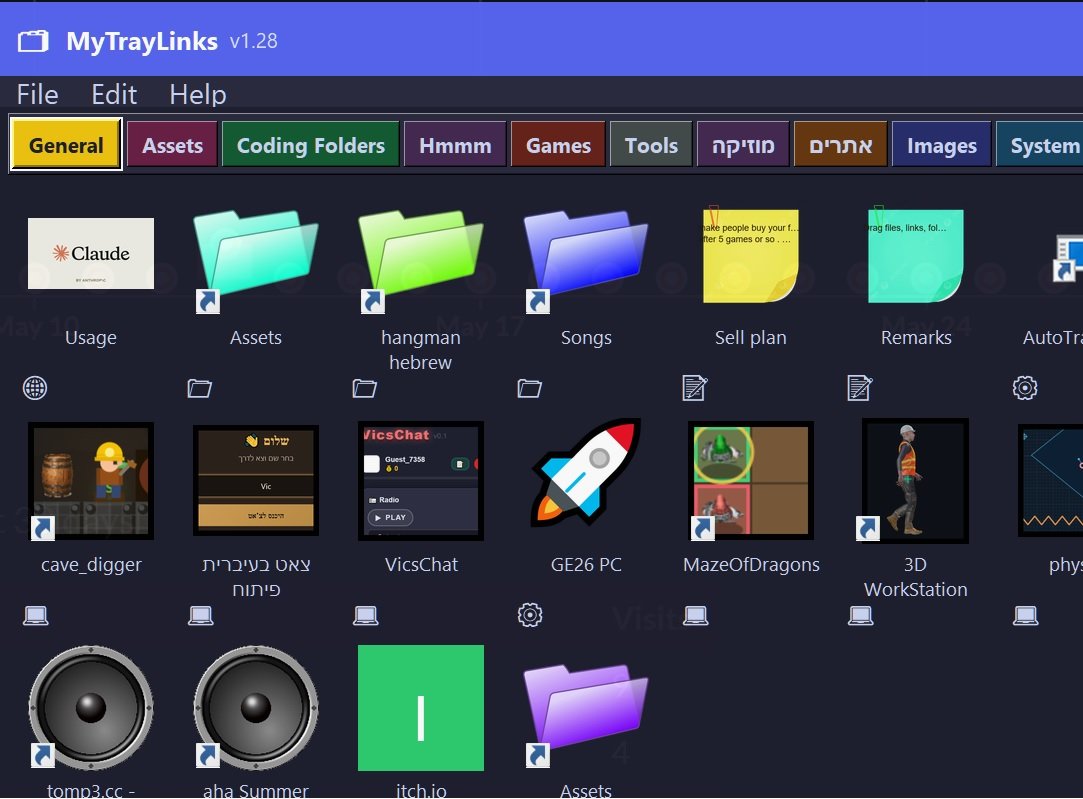
Your desktop is a mess.
We fixed that.
MyTrayLinks is a free Windows utility that sits quietly in your system tray until you need it. Click the icon and a sleek panel opens instantly — your own organized workspace with everything you touch daily.
Create color-coded tabs for each project or area of your life. Inside each tab, drop tiles that open files, folders, websites, or sticky notes in a single click. No more digging. No more browser tab chaos.
When you're done, close the panel and it disappears. MyTrayLinks stays out of your way until you need it again.
Up and running in 60 seconds
Install, add your stuff, and forget about disorganization forever.
Install & launch
Download the installer, run it, and MyTrayLinks appears in your system tray — no configuration required to get started.
Create tabs & tiles
Add color-coded tabs for each project. Inside each tab, drag in files, folders, web links, or quick notes as tiles.
Click from the tray
Click the tray icon to open your panel. Launch anything with one click. Close it and it disappears until you need it.
Everything in one place
All the essentials — nothing you don't need.
Files & Folders
Add any local folder or file as a tile. Open your project directory in one click instead of navigating File Explorer.
Web Links
Store dashboards, tools, and reference sites right beside the project they belong to. Open them instantly in your browser.
Sticky Notes
Attach quick reminders, tasks, or snippets to any tile. Always visible when you open that project's tab.
Color Tabs
Separate work, personal, and side projects with color-coded tabs. Switch context instantly without losing your place.
See it in action
Watch how MyTrayLinks keeps your workflow clean and fast.
Take back your desktop
Free to download. No account, no subscription, no nonsense.
Download Free